Software for the Mac
Anchi DAC
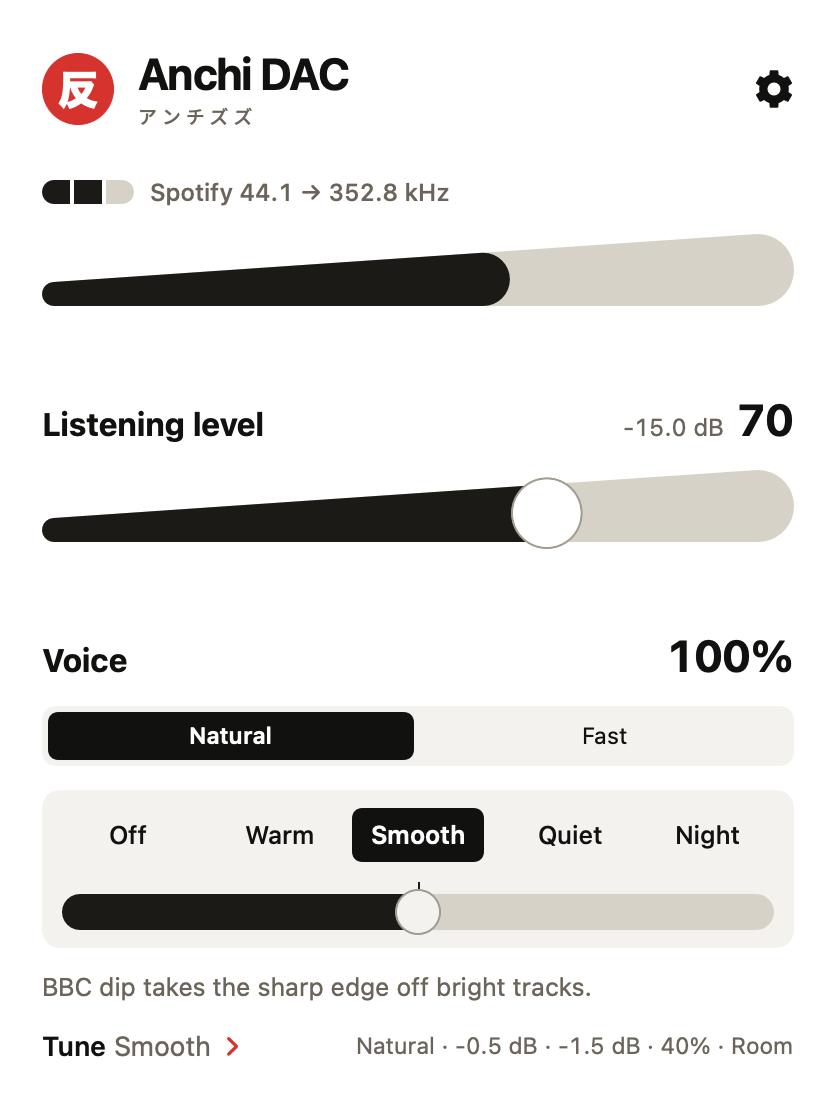
Your Mac already plays your music. With Anchi DAC, you can get a more beautiful sound out of your loudspeakers or headphones, and you won’t need to study acoustics to achieve it. It upsamples, with care, the music you already stream, Qobuz for example, in 64‑bit and up to 384 kHz, eight times the rate your Mac sends out on its own, 48 kHz. Then you can tune the sound based on your mood or the character of what you’re listening to.
Beta testers wanted
Three short questions. Licenses go on sale after the beta.
You play music from your Mac, and you want it to sound more beautiful
- You play music from your Mac into a hi‑fi or a media system.
- You listen on wired headphones, perhaps through a headphone DAC or amplifier.
- You know what a DAC is, and you value a musical one.
- You want your music to sound better, and you would rather listen than study acoustics.
- You have tried other upsampling software and found it expensive or hard to dial in to your taste.
If you listen over Bluetooth, skip it
If you listen over Bluetooth, or through AirPods, a HomePod or noise‑cancelling headphones, skip Anchi DAC. Those reshape the sound after it leaves your Mac, and the careful work may never reach your ears.
Music that moves you starts with a clean signal
You may own a good amplifier, good loudspeakers or good headphones, and still feel that streamed music from your digital source could sound more beautiful. Often the weak link is the signal you send them.
A DAC is the converter that turns digital music into the signal your amplifier plays. Even a glorious one needs a clean signal to work from.
Anchi DAC is the first stage of that work, done in software on your Mac. You keep streaming the way you do now. Your converter, or your Mac’s own output, receives a cleaner reconstruction.
You choose a voice, set the volume your way, and listen together
Anchizuzu is for listening together. With Anchi DAC, you give the soundtrack of your life a more beautiful sound: doing laundry, cooking, raking leaves, shagging, or organizing your tools.
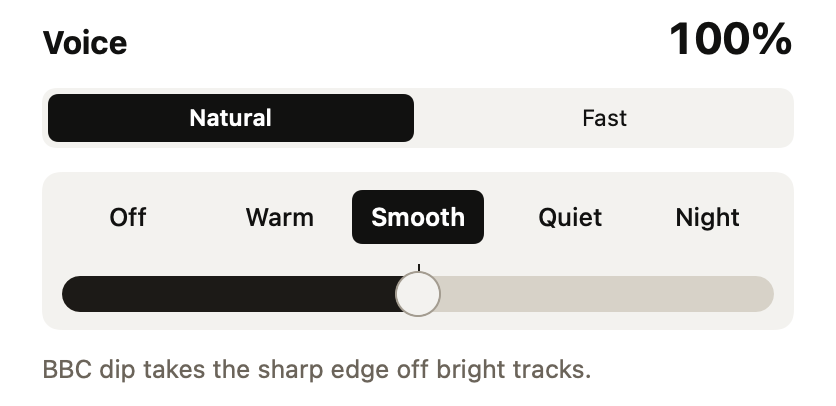
- You choose a voice: Warm, Smooth, Quiet or Night, with Natural or Fast timing and a slider for how much impact it makes. Or Off: high‑fidelity upsampling only, nothing added.
- Fast timing is for dancing together, obviously. Heads shake, Pig‑Pen style.
- Night is polite mode. You keep listening late, and nobody else has to.
- With Smooth, you soften the sharp cymbal crash or the high violin note that interrupt your point.
- With Quiet, your music sounds good even at the volume of a conversation.
- You set max volume to protect your system, whatever its vintage, once. After that, nothing should blast.
- You change the volume your way: with your Mac’s volume keys, or from across the room with the dial of your Anchi Volume Remote. Instant volume control is the ultimate social tool.
- Stays out of the way until you need it. Anchi DAC lives in your Mac’s menu bar.
I built this to combine the best of old and new
Analog downstream, where it sounds best. A digital signal source at the start, for ultimate clarity and convenience.
A digital source gives the music a quiet place to start: silence between the notes, pitch that holds steady, room for the softest passage and the loudest, and the same sound on the thousandth play as on the first.
I restored my amplifier and loudspeakers from the 1980s, and they did not sound the way I remembered. I tried a streamer, bass traps and room correction. Then my friend Jamal hooked up his tube DAC. The whole story is on my page.
The system became musical again. The equipment went away and the experience took its place. It took me right back to the beautiful sound I remembered.
I replaced the signal processor with a quality R‑2R DAC I loved immediately after hooking it up. But it still needed a clean signal source. The best Mac software DACs I found sounded good, but were expensive and difficult to use. So I built my own.
Charles Warren, San Francisco · more about why
Free during the beta, a few minutes to set up, and nothing leaves your Mac
- Who makes it? I do. I am Charles Warren, the person behind Anchizuzu in San Francisco. You write to me, and I answer. More about me.
- What does it cost? Nothing during the beta ($79 one‑time personal license after it). Already testing and want to keep it? Buy a Founding Listener license for $39 with code
FOUNDING. - How long does setup take? A few minutes. You install Anchi DAC and one free open source helper, BlackHole, which routes your music (e.g. Spotify, Apple Music, Qobuz, Tidal, Roon) to Anchi DAC. Then you pick where the music goes from there.
- Do you collect anything about me? No. You make no account, and nothing about you or your music leaves your Mac.
- Will it disturb the rest of my Mac? It might! While Anchi DAC runs, your Mac’s sound passes through it and arrives about 40 ms later. With music you never notice, and while Anchi DAC steps aside gracefully to let you take video calls, it may interfere with audio coming from other places. To go back, you quit Anchi DAC and choose your usual output in Sound settings.
For setup, licenses and every other practical question, read the Anchi DAC questions and answers.
Join the beta
Answer three questions and press the button. Your own email app opens with your answers in a message to me. Read it, then send it.
The white paper
I wrote down how Anchi DAC sounds, how I built it, what I left out on purpose, and the 26 bench tests behind it. Read the white paper.